The Home composer
The composer is the single box at the centre of the Home screen.
The composer is the single box at the centre of the Home screen. It adapts to what you type and which toolbar options you pick, so one box handles single pages, many pages, and recurring jobs.
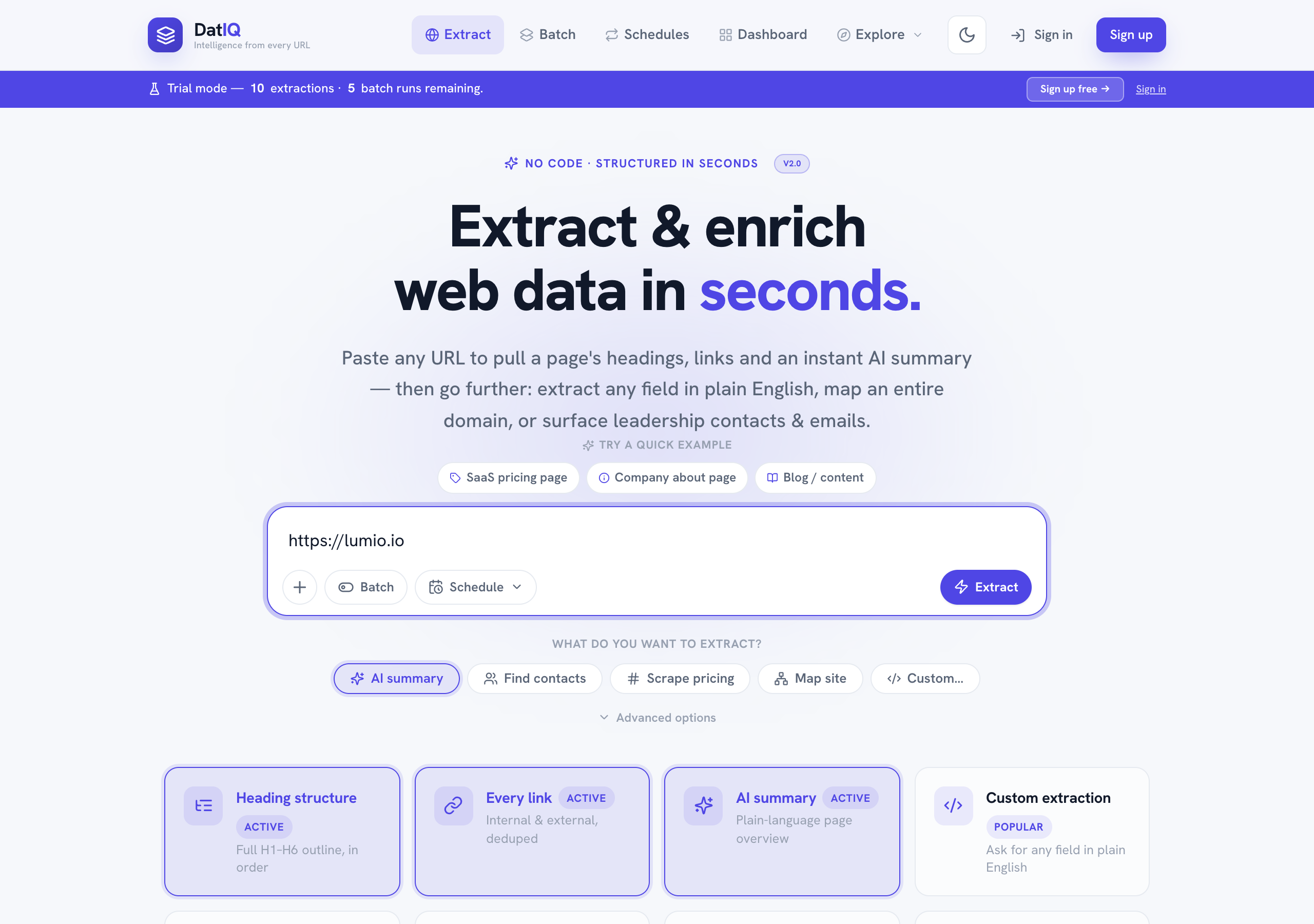
The composer is the only place you start an extraction — single page, many pages, or recurring. There is no separate "Batch" screen to go to first; paste what you have and DatIQ works out what it is.
The input box accepts:
- A single URL → a normal one-page extraction.
- Several URLs (pasted as a list, one per line) → DatIQ recognises them and runs a batch.
- Text that happens to contain links — an email, a Slack thread, a Markdown list — → DatIQ counts the
links and asks which you meant: "Extract all 8" or "Extract this text as one page". Both are reasonable readings of a newsletter with ten links in it, so DatIQ never guesses for you.
- Pasted text or page content → DatIQ can structure and summarise raw text you paste in, even without a URL.
The toolbar (bottom of the box):
- + — the options menu: Import CSV (upload a list of URLs), Add multiple URLs (switch the box to
a multi-line list), and Run in background (see below). A dot on the + means background mode is on.
- Batch — force batch mode for multiple URLs.
- Discover — shown when the box holds exactly one URL. Takes that page to the Discoverability screen
with the URL already filled in, so you can score it for search, answer engines and generative engines without retyping it. It does not start the audit — you pick the profile, device and page type and press the button yourself, so an audit is never spent on settings you did not choose.
- Schedule — arm a recurring cadence (e.g. Daily) so the extraction repeats automatically. Choose Custom schedule… to open the full scheduling screen.
- Extract — the action button. Its icon reflects the mode: a single page, a batch (layers), or a scheduled run (calendar).
You can also drag and drop a CSV file anywhere onto the box to load a list of URLs.
Run in background
Turn on Run in background in the + menu and a run keeps going while you carry on working — browse your Dashboard, start reading another page, or move around the app; the run is not tied to the screen you started it from. Progress appears in a small dock in the corner showing Extracting 3 / 12 URLs…, the URL being read right now, and a Cancel button. The setting is remembered between visits and applies to single and batch runs alike.
Tip: the quick-example chips above the box ("SaaS pricing page", "Company about page", "Blog / content")
fill the box with a sample so you can try DatIQ instantly.